1. Overview
Boolean logic is the foundation of how computers make decisions. It's a system of rules for combining true/false values (1s and 0s) to perform logical operations. Understanding Boolean logic is essential for comprehending how computer circuits and programs function.
Key Definitions
- Boolean Logic: A system of logic dealing with true or false values, represented by 1 or 0.
- Logic Gate: An electronic circuit that performs a logical operation on one or more inputs, producing a single output.
- Truth Table: A table that shows all possible input combinations for a logic gate or circuit and the corresponding output for each combination.
- Logic Expression: A mathematical representation of a logic circuit using Boolean operators.
- NOT Gate (Inverter): A logic gate with one input and one output that inverts the input value.
- AND Gate: A logic gate with two or more inputs and one output that produces an output of 1 only if all inputs are 1.
- OR Gate: A logic gate with two or more inputs and one output that produces an output of 1 if at least one input is 1.
- NAND Gate: A logic gate that is the combination of an AND gate followed by a NOT gate. Its output is 0 only if all inputs are 1.
- NOR Gate: A logic gate that is the combination of an OR gate followed by a NOT gate. Its output is 1 only if all inputs are 0.
- XOR Gate (Exclusive OR): A logic gate with two inputs and one output that produces an output of 1 if the inputs are different (one is 0 and the other is 1).
Core Content
Logic Gate Symbols:
- NOT:
- NOT:
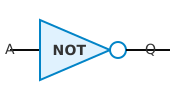
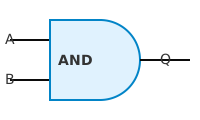
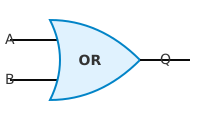
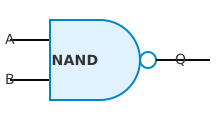
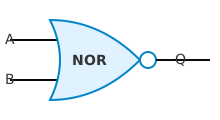
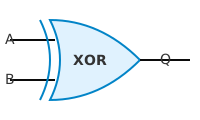
Logic Gate Functions and Truth Tables:
Gate Input(s) Output Description NOT A NOT A Inverts the input. If A is 0, output is 1. If A is 1, output is 0. AND A, B A AND B Output is 1 only if BOTH A and B are 1. OR A, B A OR B Output is 1 if EITHER A or B (or both) is 1. NAND A, B NOT (A AND B) Output is 0 only if BOTH A and B are 1. NOR A, B NOT (A OR B) Output is 1 only if BOTH A and B are 0. XOR A, B A XOR B Output is 1 if A and B are DIFFERENT (one is 0 and the other is 1). Example Truth Tables:
NOT Gate:
A NOT A 0 1 1 0 AND Gate:
A B A AND B 0 0 0 0 1 0 1 0 0 1 1 1 OR Gate:
A B A OR B 0 0 0 0 1 1 1 0 1 1 1 1 NAND Gate:
A B A NAND B 0 0 1 0 1 1 1 0 1 1 1 0 NOR Gate:
A B A NOR B 0 0 1 0 1 0 1 0 0 1 1 0 XOR Gate:
A B A XOR B 0 0 0 0 1 1 1 0 1 1 1 0 Creating Logic Circuits:
- From a Problem Statement:
- Identify the inputs (variables).
- Determine the conditions for the output to be 1.
- Translate the conditions into a logic expression.
- Draw the circuit using the corresponding logic gates.
- From a Logic Expression:
- Each AND, OR, and NOT operator maps directly to an AND, OR, and NOT gate respectively.
- Use brackets to determine the order of operations.
- From a Truth Table:
- Identify the rows where the output is 1.
- For each row, create an AND expression of the inputs. If an input is 0, invert it using NOT.
- OR together all the AND expressions created in the previous step.
- Draw the logic circuit equivalent to that expression.
- From a Problem Statement:

*Example:*
*Problem statement*: The output should be 1 if A is 1 AND B is 0.
*Logic expression*: A AND NOT B
*Circuit*: Input A goes to an AND gate, Input B goes to a NOT gate, the output of the NOT gate is input to the AND gate. The output of the AND gate is the final output.
Completing Truth Tables:
- List all possible input combinations. For n inputs, there are 2n combinations.
- Systematically list the combinations using binary counting.
- For each combination, trace the signal through the circuit, gate by gate.
- Record the output of each gate in the table as an intermediate step.
- The final output of the circuit is the last column in the table. Example: Truth table for (A AND NOT B) OR C with intermediate columns
| A | B | C | NOT B | A AND NOT B | (A AND NOT B) OR C |
|---|---|---|---|---|---|
| 0 | 0 | 0 | 1 | 0 | 0 |
| 0 | 0 | 1 | 1 | 0 | 1 |
| 0 | 1 | 0 | 0 | 0 | 0 |
| 0 | 1 | 1 | 0 | 0 | 1 |
| 1 | 0 | 0 | 1 | 1 | 1 |
| 1 | 0 | 1 | 1 | 1 | 1 |
| 1 | 1 | 0 | 0 | 0 | 0 |
| 1 | 1 | 1 | 0 | 0 | 1 |
Work through the circuit step by step, recording intermediate values.
Writing Logic Expressions:
From a Problem Statement: Identify key words: "AND" means an AND gate, "OR" means an OR gate, "NOT" means to invert.
From a Logic Circuit: Work backwards from the output, noting the gates and their inputs. Represent each gate with its corresponding operator. Example: An AND gate with inputs A and B will be represented as (A AND B). Example: The output from NOT gate with input A is written as NOT A
From a Truth Table:
- Identify all rows where the output is 1.
- For each row, create a term where the inputs are ANDed together. If the input is 0, negate (NOT) it.
- OR together all the terms created in the previous step.
Example:
A B Output 0 0 0 0 1 1 1 0 0 1 1 1 Rows with output 1: Row 2 (0, 1) and Row 4 (1, 1) Term for Row 2: (NOT A) AND B Term for Row 4: A AND B Final Expression: ((NOT A) AND B) OR (A AND B)
Exam Focus
- Logic Gate Identification: Accurately recognize and draw standard logic gate symbols.
- Truth Table Completion: Construct and complete truth tables correctly. Pay attention to all possible input combinations.
- Circuit Design: Be able to design circuits from problem statements, logic expressions, or truth tables, using appropriate logic gates. Show the connections clearly.
- Logic Expression Creation: Derive logic expressions from various sources, using correct notation and order of operations (brackets!).
Common Mistakes to Avoid
- ❌ Wrong: Confusing AND and OR gate functions. ✓ Right: AND gate output is 1 only if ALL inputs are 1. OR gate output is 1 if ANY input is 1.
- ❌ Wrong: Incorrectly inverting inputs when creating expressions from truth tables. ✓ Right: If input A is 0 in a row where the output is 1, use NOT A in the expression.
- ❌ Wrong: Not considering all possible input combinations when constructing a truth table. ✓ Right: With n inputs, there are 2n possible combinations.
- ❌ Wrong: Using non-standard logic gate symbols. ✓ Right: Use the IGCSE Computer Science standard symbols for logic gates.
- ❌ Wrong: Omitting brackets in logic expressions, leading to incorrect order of operations. ✓ Right: Use brackets to clearly define the order of operations, just like in mathematics.
Exam Tips
- Always double-check your truth tables to ensure you have listed all possible input combinations.
- When designing a circuit, clearly label all inputs and outputs.
- If a question asks you to simplify a logic circuit or expression, state that simplification is outside the scope of the syllabus. Attempting to simplify if not asked can lead to errors.
- Practice translating between problem statements, logic expressions, truth tables, and logic circuits. The more you practice, the better you will become.