1. Overview
This section introduces the fundamental concepts of the internet and the World Wide Web, the technologies that underpin modern online communication and data access. Understanding these technologies is crucial for comprehending how information is located, retrieved, and displayed on devices, which is vital for cybersecurity, programming, and general computer literacy.
Key Definitions
- Internet: A global network of interconnected computer networks that use the TCP/IP protocol suite to communicate with each other. It's the infrastructure that supports various services.
- World Wide Web (WWW): A collection of web pages and websites accessed via the internet, using protocols like HTTP/HTTPS. It's a service running on the internet.
- Uniform Resource Locator (URL): The address used to access resources on the web.
- Hypertext Transfer Protocol (HTTP): The protocol used for transferring web pages and other data over the internet.
- Hypertext Transfer Protocol Secure (HTTPS): A secure version of HTTP that uses SSL/TLS encryption to protect data transmitted between a client and a server.
- Web Browser: A software application used to access and view web pages on the World Wide Web.
- IP Address: A unique numerical identifier assigned to each device connected to a computer network that uses the Internet Protocol for communication.
- Domain Name System (DNS): A hierarchical and decentralized naming system for computers, services, or other resources connected to the internet or a private network. It translates domain names into IP addresses.
- Web Server: A computer system that hosts websites and responds to HTTP requests from web browsers.
- HTML (Hypertext Markup Language): The standard markup language for creating web pages, providing the structure and content of the page.
- Cookies: Small text files that websites store on a user's device to remember information about the user, such as login details or preferences.
- Session Cookie: A temporary cookie that is deleted when the browser is closed.
- Persistent Cookie: A cookie that remains on the user's device even after the browser is closed and has an expiration date.
Core Content
A. Internet vs. World Wide Web
Internet:
- The physical infrastructure: cables, routers, servers.
- Supports various services: email, file transfer, VoIP, the WWW.
- Uses TCP/IP protocol.
World Wide Web (WWW):
- A collection of interconnected web pages.
- Accessed via the internet using HTTP/HTTPS.
- One service running on the internet.
- The WWW needs the internet to function.
Analogy: Think of the internet as roads and the WWW as the cars that travel on those roads.
B. Uniform Resource Locator (URL)
- Structure:
protocol://domain-name/path/page - Example:
https://www.example.com/folder/page.html - Protocol:
httporhttps - Domain name: Identifies the website (e.g.,
www.example.com) - Path: The location of the resource within the website's file system (e.g.,
/folder/page.html) - Query string: Optional part after the path that passes information to the server. Starts with a question mark (e.g.,
?key=value).
C. HTTP and HTTPS
| Feature | HTTP | HTTPS |
|---|---|---|
| Protocol | Hypertext Transfer Protocol | Hypertext Transfer Protocol Secure |
| Security | Unencrypted | Encrypted using SSL/TLS |
| Data Protection | Vulnerable to interception | Data is secure from eavesdropping |
| Use Cases | Public information | Sensitive data (login, banking, etc.) |
| Indication | None | Padlock icon in the browser |
- HTTP Operation:
- Client (browser) sends an HTTP request to the server.
- Server receives the request and processes it.
- Server sends an HTTP response back to the client, containing the requested data (e.g., HTML).
- Stateless: HTTP doesn't remember previous requests.
- HTTPS Operation:
- Same as HTTP, but with encryption using SSL/TLS.
- Data is encrypted between the client and the server, preventing eavesdropping.
- Certificate verifies website identity.
D. Web Browser Purpose and Functions
- Purpose: To access and view web pages.
- Functions:
- Storing bookmarks/favorites: Allows users to save frequently visited web pages for easy access.
- Recording history: Keeps a record of visited web pages, allowing users to revisit them or clear the history for privacy.
- Allowing multiple tabs: Enables users to open multiple web pages in a single browser window.
- Storing cookies: Small text files stored on the user's device by websites to remember user preferences, login information, etc.
- Providing navigation tools: Back, forward, home, refresh buttons for easy navigation.
- Providing an address bar: Allows users to enter URLs to access specific web pages and displays the current page's URL.
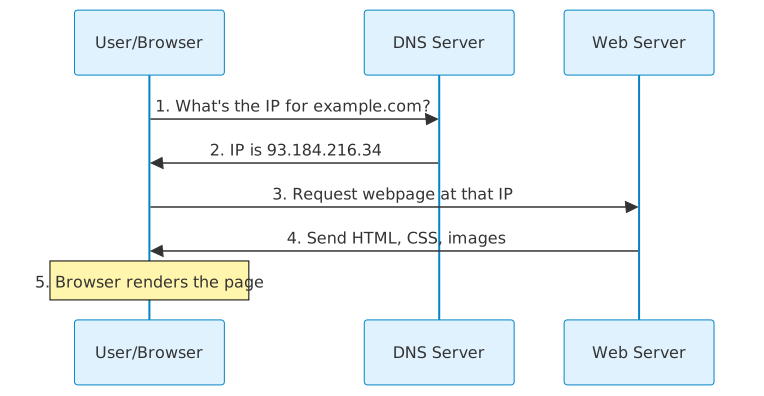
E. Locating, Retrieving, and Displaying Web Pages
- User enters URL: The user types a URL (e.g.,
www.example.com) in the browser's address bar. - Browser contacts DNS server: The browser sends the domain name (
www.example.com) to a DNS server. - DNS returns IP address: The DNS server translates the domain name into the web server's IP address (e.g.,
192.0.2.1). - Browser sends HTTP request: The browser sends an HTTP request to the web server's IP address.
- Web server finds file: The web server locates the requested file (e.g.,
index.html). - Server sends HTML file: The web server sends the HTML file back to the browser as an HTTP response.
- Browser renders HTML: The browser interprets the HTML code and displays the web page on the user's screen.
- Browser requests additional resources: The browser requests additional resources (images, CSS, JavaScript files) to fully render the web page.
F. Cookies
- Definition: Small text files stored on a user's device by websites.
- Types:
- Session cookies: Temporary, deleted when the browser closes. Used for maintaining session information (e.g., shopping cart contents, login status).
- Persistent cookies: Remain on the user's device after the browser closes, with an expiry date. Used for remembering login details, preferences, and tracking user behavior.
- Uses:
- Remembering login information
- Storing user preferences (e.g., language, theme)
- Tracking browsing habits for targeted advertising
- Maintaining shopping cart contents
- Privacy Concerns:
- Cookies can track browsing habits.
- Used for targeted advertising, which some users find intrusive.
- Users can block or delete cookies in their browser settings.
Exam Focus
- Key points: Ensure you understand the distinction between the internet and the WWW, the role of HTTP/HTTPS, and the purpose of web browsers and cookies.
- Technical terminology: Use precise terms like "protocol," "domain name," "IP address," "DNS server," "HTML," "session cookie," and "persistent cookie."
- Depth of explanation: Be able to explain the process of accessing a web page step-by-step, from entering the URL to the browser displaying the page. You should also be able to discuss the privacy implications of cookies.
- Browser Functions: You must know about storing bookmarks, recording history, allowing multiple tabs, storing cookies, providing navigation tools, providing an address bar.
Common Mistakes to Avoid
- ❌ Wrong: The internet is the same as the World Wide Web. ✓ Right: The World Wide Web is a service that runs on the internet.
- ❌ Wrong: Cookies are only used for good things. ✓ Right: Cookies can be used for legitimate purposes like remembering login details, but they can also raise privacy concerns.
- ❌ Wrong: HTTP is secure. ✓ Right: HTTPS is the secure version of HTTP and uses encryption.
Exam Tips
- When explaining the process of accessing a web page, break it down into clear, numbered steps.
- Always define technical terms when using them in your answer.
- Consider the advantages and disadvantages of using cookies from both the website's and the user's perspective.
- When discussing security, always highlight the importance of HTTPS for protecting sensitive data.